
Choosing the wrong down-the-hole (DTH) bit can cost you hours of lost drilling time and thousands of dollars in premature tool failure. Every rock formation—from soft limestone to fractured granite—demands a specific bit geometry, carbide grade, and face design. Yet many operators rely on guesswork or habit, picking the same bit they used on the last job. That approach rarely works across different sites.
This tutorial explains how to match DTH bit size and type to your specific formation conditions. You will learn a repeatable selection process based on rock hardness, abrasiveness, fracture frequency, and hole diameter requirements. Whether you are drilling water wells, blast holes, or foundation piers, the steps here apply to any DTH operation. The goal is simple: maximize penetration rate while minimizing cost per meter drilled.
Match bit diameter to hammer size and casing requirements for optimal energy transfer
Select concave or convex face profiles based on rock hardness and fracture behavior
Choose carbide grade and button shape according to formation abrasiveness
Adjust gauge protection design when drilling in broken or fractured ground
Verify bit compatibility with your existing DTH hammer before purchasing
Before you begin the selection process, gather the following information about your drilling operation:
Formation data: Rock type, unconfined compressive strength (UCS) in MPa, abrasivity index (e.g., Cerchar abrasivity test results)
Hole specifications: Target diameter, depth, and tolerance requirements
Hammer specifications: Shank size, operating pressure range, and recommended bit diameters from the manufacturer
Compressor capacity: Air volume (m³/min) and pressure (bar) available at the drill rig
Past performance records: Penetration rates, bit life in meters, and failure modes from previous jobs in similar formations
If you are unsure about your hammer compatibility, review the product specifications for your rig. For example, the Down-the-Hole Drilling Rigs offered by Haichuang Unite include detailed shank dimensions and recommended bit sizes in their technical documentation.
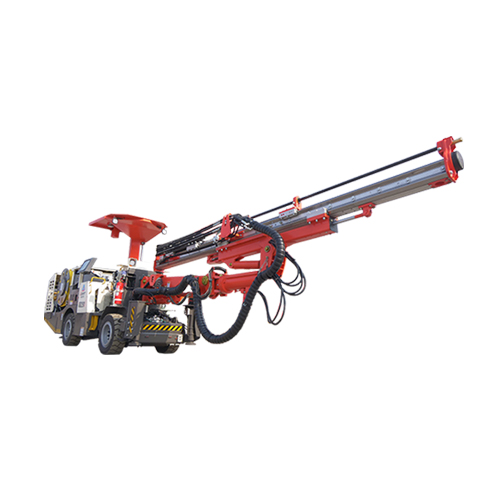
Identify the final hole diameter required by your project specifications. This is usually set by the casing size, blasting pattern, or well screen diameter.
Check your hammer’s recommended bit diameter range. Most DTH hammers work best within a specific diameter window—typically 10–20 mm below the hammer body diameter for efficient exhaust flow.
Account for gauge loss over time. A new bit may drill at nominal diameter, but after 50–100 meters in abrasive rock, gauge wear can reduce hole diameter by 2–5 mm. If tight tolerances are critical, start with a bit 2–3 mm oversize.
Consider pilot hole requirements. For large-diameter holes (over 300 mm), you may need a pilot bit followed by a reaming bit. The pilot bit diameter should be 60–70% of the final hole diameter.
Bit diameter directly affects penetration rate and energy transfer. A bit that is too small for the hammer causes inefficient energy transmission—the piston energy dissipates into the hammer body instead of the rock. A bit that is too large restricts exhaust flow, slowing the hammer cycle. Industry data shows that matching bit diameter within 5 mm of the hammer’s optimal range improves penetration rate by 15–25% compared to mismatched combinations.
Using a worn bit from a previous job without checking diameter: Gauge wear can reduce diameter by 3–5 mm, causing the bit to jam in the hole or produce undersized holes.
Assuming all hammers of the same shank size accept the same bit diameter: Different hammer designs have different exhaust port locations. Always verify with the manufacturer’s chart.
For soft to medium formations (UCS 20–80 MPa): Choose a convex face profile. The domed shape concentrates impact energy at the center, producing a deeper crater with each blow. This profile works well in limestone, sandstone, and shale.
For hard formations (UCS 80–150 MPa): Choose a concave face profile. The dish-shaped face distributes impact energy across a wider area, reducing point loading on individual carbide buttons. This prevents button breakage in granite, basalt, and quartzite.
For very hard or fractured formations (UCS above 150 MPa): Choose a flat face profile with heavy-duty carbide buttons. The flat surface provides maximum button support and minimizes stress concentration at the button edges.
Face profile geometry determines how impact energy transfers from the bit to the rock. A convex face in hard rock creates excessive stress on the center buttons, leading to premature carbide fracture. A concave face in soft rock wastes energy because the dish shape prevents the bit from penetrating deeply. Matching profile to hardness can extend bit life by 30–50% in consistent formations.
Using a convex face in hard granite: The center buttons will chip or break within 20–30 meters. Switch to concave or flat face.
Using a concave face in soft clay or chalk: The bit will “bounce” instead of penetrating, reducing penetration rate by 40% or more.
Determine the formation’s abrasivity index (Cerchar abrasivity test, typical range 0.5–5.0). Low abrasivity (0.5–2.0) includes limestone, marble, and gypsum. Medium abrasivity (2.0–3.5) includes sandstone, dolomite, and schist. High abrasivity (3.5–5.0) includes quartzite, granite, and chert.
For low abrasivity formations: Use standard-grade carbide (ISO K20–K30) with hemispherical buttons. The rounded shape provides good penetration without excessive wear.
For medium abrasivity formations: Use premium-grade carbide (ISO K30–K40) with semi-ballistic buttons. The slightly flattened tip resists wear while maintaining penetration efficiency.
For high abrasivity formations: Use heavy-duty carbide (ISO K40–K50) with ballistic or conical buttons. The sharp tip penetrates hard rock effectively, and the tougher carbide grade resists abrasive wear.
Carbide grade directly controls wear resistance. Standard-grade carbide in quartzite can wear 3–5 mm per 100 meters, requiring bit replacement after 200–300 meters. Heavy-duty carbide in the same formation may wear only 1–2 mm per 100 meters, lasting 500–700 meters. The cost difference between standard and premium carbide is typically 15–25%, but the life extension often exceeds 50%, making premium grades more economical in abrasive rock.
Using standard carbide in high-abrasivity formations: Expect rapid gauge loss and button wear. The bit may need replacement after 150 meters.
Using ballistic buttons in soft rock: The sharp tips dig in too deeply, causing the bit to stick or drill an oversized hole.
Assess the fracture frequency of your formation. Heavily fractured rock (joint spacing less than 200 mm) causes gauge buttons to experience lateral impact forces that can snap them off.
For fractured ground: Choose a bit with heavy-duty gauge protection—typically larger gauge buttons (14–16 mm diameter) set at a steeper angle (30–35 degrees from vertical). Some bits feature gauge inserts that extend beyond the bit body to protect the steel from wear.
For massive, unfractured rock: Standard gauge protection (12–14 mm buttons at 20–25 degrees) is sufficient. The buttons will wear evenly without risk of breakage.
Consider a bit with a drop center design: The center of the face is recessed 3–5 mm below the gauge buttons. This reduces the impact on center buttons when the bit encounters a fracture, preventing breakage.
In fractured ground, gauge buttons experience impact loads up to three times higher than in massive rock. A standard gauge design may lose 30–40% of its buttons within 50 meters in heavily jointed granite. Heavy-duty gauge protection can reduce button loss to under 10% over the same interval, saving the cost of an early bit change.
Ignoring fracture frequency when selecting bits: A bit that works perfectly in massive rock may fail within hours in fractured ground.
Using a drop center bit in soft, uniform rock: The recessed center reduces penetration rate by 10–15% because less energy reaches the center of the hole.
Check the shank connection type: Most DTH bits use a spline drive or keyed drive connection. Spline drives are common in hammers from Atlas Copco, Sandvik, and Halco. Keyed drives appear in older or specialized hammers.
Measure the shank diameter and length: The bit shank must match the hammer’s chuck dimensions exactly. A 0.5 mm difference in shank diameter can cause the bit to wobble or seize.
Confirm the thread type (if applicable): Some bits use a threaded connection to the hammer. Common threads include API 2-3/8, API 3-1/2, and various metric threads. Mismatched threads will not seal properly, causing air leakage and reduced performance.
Verify the operating pressure range: The bit must be rated for the hammer’s operating pressure. Bits designed for low-pressure hammers (7–10 bar) may fail under high-pressure operation (15–25 bar) due to increased impact energy.
An incompatible bit can damage both the bit and the hammer. A shank that is too small will spin inside the chuck, wearing down the splines and reducing energy transfer. A shank that is too large will not fit, requiring a different hammer or bit. Thread mismatch can cause the bit to unscrew during operation, leading to a lost bit in the hole—a costly fishing job.
Assuming all DTH bits with the same shank diameter are interchangeable: Different hammer brands use different spline profiles. Always test-fit the bit before running it in the hole.
Using a bit rated for low pressure on a high-pressure hammer: The bit may crack or shatter within the first few blows.
Keep a drilling log for every hole: Record bit type, formation description, penetration rate, and total meters drilled. After 10–20 holes, you will have data to optimize bit selection for that specific site.
Rotate bits between holes: Running the same bit continuously can cause uneven wear. Rotating bits every 50–100 meters extends overall bit life by 15–20%.
Inspect bits after every shift: Look for chipped buttons, gauge wear, and shank damage. A small chip can propagate into a major failure if left unchecked.
Match bit type to the drilling rig: For surface drilling, consider using a Top-Hammer Drilling Rigs for smaller holes (up to 127 mm) where DTH may be overkill. For larger holes, DTH is the standard choice.
Test a new bit type on a single hole before committing to a full order: One test hole can save thousands of dollars in wasted bits.
A DTH bit is attached directly to the hammer, which sits at the bottom of the hole. The hammer strikes the bit directly, transferring energy efficiently through the drill string. A top-hammer bit is struck by a hammer at the surface, with energy transmitted through the drill rods. DTH bits are preferred for deep holes (over 30 meters) and hard rock, while top-hammer bits work well for shallow holes in softer formations. Relevant specifications and application guidance are available through Top-Hammer Drilling Rigs.
Replace the bit when gauge diameter has worn 3–5 mm below nominal, when more than 20% of carbide buttons are chipped or missing, or when penetration rate drops by more than 25% compared to a new bit. Regular inspection every 50 meters helps catch wear early.
Yes, but performance will vary. A bit optimized for hard granite will drill slowly in soft limestone and may wear unevenly. For best results, select a bit based on the dominant formation at your site. If formations vary widely, consider a bit with a flat face and medium-grade carbide as a compromise.
Follow the hammer manufacturer’s recommended pressure range. Typical operating pressures are 10–15 bar for standard hammers and 15–25 bar for high-pressure hammers. Running too low pressure reduces penetration rate; running too high pressure can damage the bit and hammer.
Use DTH bits for hard, fractured, or abrasive rock where impact energy is needed to break the rock. Use rotary bits (tricone or PDC) for soft to medium formations where crushing or shearing action is more efficient. DTH bits typically achieve higher penetration rates in rock with UCS above 80 MPa.
Selecting the right DTH bit size and type for your formation does not have to be guesswork. By following these five steps—determining diameter, selecting face profile, choosing carbide grade, evaluating gauge protection, and verifying compatibility—you can match the bit to the rock with confidence. The result is faster penetration, longer bit life, and lower cost per meter drilled.
Start by gathering your formation data and hammer specifications. Then apply the selection criteria outlined here. For a full range of compatible drilling equipment, browse the View Products >> page to find hammers and bits designed for your specific application. With the right bit in the right formation, you will spend less time changing tools and more time making hole.
Copyright:@2020-2021

Comments Please sign in or sign up to post.
0
0 of 500 characters used